How I Hosted a Website on the Dark Web and How It Prevents Anyone from Tracing Back to the Client IP.
- prabhu perumal
- Mar 3
- 7 min read


There are different types of Darkweb networks, which are Tor,I2P ,Freenet,ZeroNet and GNUnet. Each have their own network use:

Privacy is about having control over your own information and that's exactly what Cybersecurity about too, protect and control your assets and information. When you think about it, the Dark Web follows that same principle as well.
i would like to talk about Tor Network :
When a person opens Tor Browser and types a website address, they are not connecting to the internet the way a normal browser does. In the normal web, your computer asks a DNS server for a domain’s IP address, then directly opens a TCP connection to that server. Your ISP can see where you are connecting. The website can see your IP address. Even if HTTPS encrypts the content, the network path is visible.
TCP has: Source & destination IP, port numbers, sequence & acknowledgment numbers, flags (SYN, ACK, FIN), checksum, and raw payload.

HTTPS has: Request method, URL, headers, cookies, authentication tokens, request & response body, SSL/TLS certificates, and status codes

Internet Architecture (Clearnet):

MY DEVICE REQUEST -> HOME ROUTER/NAT ->ISP -> INTERNET -> DNS -> CDN/LOAD BALANCER-> WEB SERVER
Tor works differently because it builds an overlay network on top of the internet. Instead of sending traffic directly to a destination, Tor creates a circuit through multiple volunteer-operated relays. These relays are called onion routers. Each time you connect, Tor selects at least three nodes: an entry node (guard), a middle node, and either an exit node (for normal websites) or a rendezvous point (for onion services).
Tor has : Guard/Entry Node → Middle/Relay Node → Exit NodeWhen your Tor client starts, it first chooses a small set of trusted entry nodes called guard nodes. These guards are long-term selections, often kept for months. This design is intentional: by sticking to a small set of entry nodes, you reduce the risk of eventually connecting through a malicious entry node that might try to observe you.
Your computer then establishes a cryptographic handshake with the guard node using a protocol called ntor, based on Curve25519 elliptic curve cryptography. Both sides exchange ephemeral public keys and compute a shared secret. That secret becomes the symmetric encryption key for that hop. Then the client extends the circuit to a middle node, performing another key exchange, and then to an exit node or rendezvous node, performing yet another handshake. At the end of this process, the client has layered encryption keys for each hop in the path.
ntor Handshake nodes hold:

1.Curve25519 public/private key pairs — one for the client, one for the relay
2.Node identity key — to verify the relay is legitimate
3.Ephemeral keys — freshly generated for each session so old sessions can't be decrypted later (forward secrecy)
4.Shared secret — derived from both keys combined using Diffie-Hellman over Curve25519
5.Key material — expanded from the shared secret to encrypt the actual traffic

Curve25519 is considered extremely secure — 128-bit security level, resistant to most known attacks, and much faster than older RSA-based handshakes. The ephemeral nature means even if a private key is compromised later, past sessions remain safe. This is called Perfect Forward Secrecy.
When your browser sends data, it encrypts the payload multiple times — once for each relay in the circuit. The outermost layer is for the guard. Inside that is a layer for the middle node. Inside that is a layer for the exit or rendezvous node. Each relay only removes its own encryption layer and forwards the remaining encrypted data. No single relay ever sees both where the traffic came from and where it is going.
TOR ARCHITECTURE:
MY DEVICE  -> GUARD NODE A -> MIDDLE NODE A -> GUARD NODE B -> MIDDLE NODE B  -> EXIT NODE -> HTTP REQUEST->  PUBLIC WEBSITE

 Each node is encrypted, they dont have the information of each other nodes and its IPaddress.

Only guard Node knows my device IP and Exit Node knows service IP.
If you are browsing a normal website through Tor, the final relay is an exit node. The exit node decrypts the last layer and sends the traffic to the public internet. The website sees the exit node’s IP address, not yours. The guard node knows your real IP but does not know what site you are visiting. The exit node knows what site is being contacted but does not know who you are. The middle node knows only the previous and next relay. The anonymity comes from this separation of knowledge.
Onion services work differently. There is no exit node. Instead, both the client and the service build circuits inside Tor. The onion address itself is not resolved via DNS. It is derived from the service’s public key. When a client wants to visit an onion service, it uses the onion address to locate a descriptor stored in Tor’s distributed directory system.
Tor may be have 7000+ Nodes IP AddressesLets talk about cookies:The client selects a random relay to act as a rendezvous point and builds a circuit to it. The client then contacts one of the service’s introduction points and sends an encrypted message saying, essentially, “Meet me at rendezvous relay X using this secret cookie.” The service receives that message, builds its own circuit to the same rendezvous point, and presents the cookie. When the rendezvous relay sees matching cookies from two circuits, it links them internally. From that moment on, the client and service communicate through two three-hop circuits joined in the middle. The client never learns the service’s real IP address. The service never learns the client’s real IP address. The rendezvous relay only sees two encrypted streams connected together.
Because onion service traffic never leaves the Tor network, there is no exit node involved. This removes one of the main observations points that attackers often target in normal Tor browsing.
what about Packets Trace: However, Tor’s anonymity is not absolute. It protects content using strong cryptography, but metadata such as packet timing and size — still exists. Researchers have long studied a method called traffic correlation or end-to-end timing analysis. The idea is simple in theory: if an attacker can observe traffic entering the Tor network at the entry node and traffic leaving at the exit node, they can compare timing patterns. If a burst of 200 kilobytes enters the network at 12:01:00 and a similar burst exits at 12:01:01, statistical analysis might suggest that they are linked.
Tor anonymity is therefore a balance between cryptographic strength, network design, and user behavior. When used correctly, it provides strong protection against most realistic threats. When faced with powerful, well-resourced adversaries conducting large-scale monitoring and correlation, it becomes a statistical contest rather than an absolute guarantee.How I Hosted a Website on the Dark Web
All you actually need is a web application running locally, Tor installed on your machine, a hidden service configuration, and basic operational security. That's the entire foundation.
I did in macbook , so i have given commands in "brew" installation.
Running the Application Locally
The first and most critical step is making sure your application runs only on localhost — meaning it is completely invisible to the public internet. Using Flask, you bind the app strictly to 127.0.0.1 on port 5001 so that only your machine can access it directly.
app.run(host="127.0.0.1", port=5001)Once it's running, you verify it is actually listening on localhost and not exposed publicly by checking the active TCP connections.
lsof -nP -iTCP:5001 | grep LISTENThe output must show 127.0.0.1:5001. If it shows 0.0.0.0, your server is publicly exposed and needs to be fixed immediately before going any further.
Adding Nginx as a Reverse Proxy
Rather than connecting Tor directly to your application, a cleaner and more secure approach is placing Nginx in between as a reverse proxy. You first install Nginx on your machine.
brew install nginxThen you create a server configuration that makes Nginx listen on 127.0.0.1:8080 and forward all requests to your Flask app running on port 5001.
server {
    listen 127.0.0.1:8080;

    location / {
        proxy_pass http://127.0.0.1:5001;
        proxy_set_header Host $host;
        proxy_set_header X-Forwarded-For $remote_addr;
    }
}
After saving the config, you test and restart Nginx to apply the changes.
nginx -t
brew services restart nginx
You can verify it is working correctly by making a local request.
The architecture at this point is Browser → Nginx → Flask, entirely contained within your local machine with nothing exposed to the outside world.
Installing and Configuring Tor
Once your local stack is running, you install Tor and configure it to create a hidden service.
brew install tor
brew services start tor
You then edit the Tor configuration file to define the hidden service.
sudo nano /opt/homebrew/etc/tor/torrc Inside the file, you add two lines — one pointing to the directory where Tor will store your onion service's private key and hostname, and another mapping external port 80 to your local Nginx on port 8080.
HiddenServiceDir /opt/homebrew/var/lib/tor/my_onion_service/
HiddenServicePort 80 127.0.0.1:8080
You then create that directory with the correct permissions so Tor can write to it securely.
sudo mkdir -p /opt/homebrew/var/lib/tor/my_onion_service
sudo chown -R $(whoami) /opt/homebrew/var/lib/tor/my_onion_service
chmod 700 /opt/homebrew/var/lib/tor/my_onion_service
Finally, you restart Tor to apply the hidden service configuration.
brew services restart torGetting Your Onion Address
After Tor restarts, it automatically generates a unique .onion address derived cryptographically from your hidden service's private key. You retrieve it with a single command.
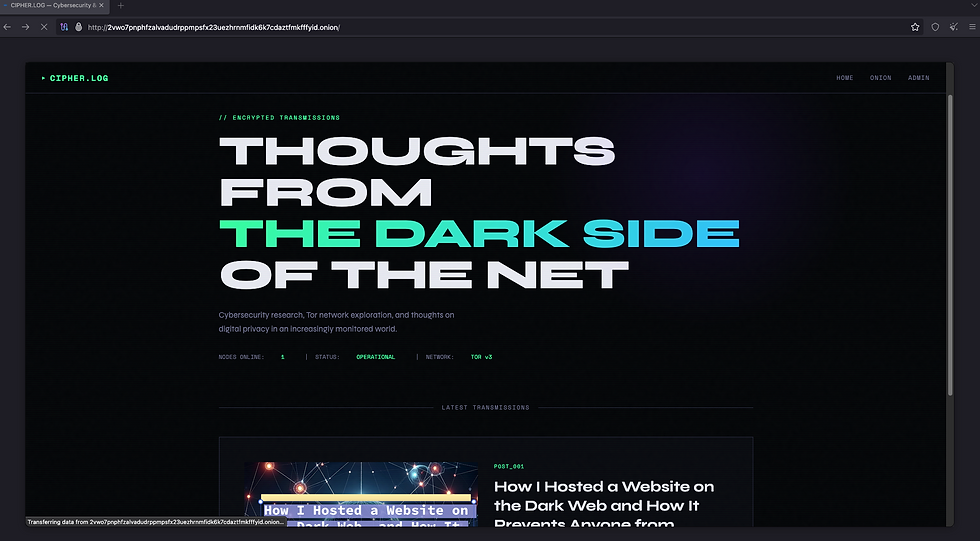
cat /opt/homebrew/var/lib/tor/my_onion_service/hostnameAbove is my dark web Blog page URL.
That address is mathematically tied to a key file on your machine, not to any identity or IP address.
The Real Architecture
Once everything is connected, the full path a visitor takes to reach your website looks like this — Client → Guard Node → Middle Node → Rendezvous Point → Middle Node → Guard Node → MyTor → Nginx → Flask. At no point is your real IP address exposed. You never open a port on your router, never touch your firewall, and never need a domain name, DNS, SSL certificate, or public IP. Tor handles all routing and encryption entirely through outbound connections only.
What Actually Makes It "Dark Web"
The dark web label has nothing to do with special hosting or encrypted servers. What makes it dark web is simply that Tor creates an encrypted multi-hop circuit and publishes your service inside the Tor network instead of the public DNS system. Nobody outside that circuit knows where the traffic is going or where it originates.The onion address is cryptographically generated, meaning it belongs to whoever holds the private key, no registrar, no identity, no paper trail.
The Bigger Picture
What this entire setup demonstrates is that anonymity on the dark web is an architecture. Carefully designed, layered, and mathematically grounded architecture. The same principles that protect a whistleblower, a journalist, or a dissident in an authoritarian country are the same principles running underneath this simple Flask and Nginx setup. Privacy and control over your own infrastructure, taken to its logical technical conclusion.


Comments