Building “Tetrisgame”: A Full CI/CD Pipeline on AWS with ECS Fargate, ECR, CodeBuild & CodePipeline


In this project, I wanted to take something simple and visual – a Tetris-style web page – and use it to practice real DevOps on AWS:
Containerize an app with Docker
Push images to Amazon ECR
Run containers with ECS Fargate
Expose it to the internet
Automate builds and deployments using CodeBuild + CodePipeline
Deal with real-world issues like ARM vs AMD64 images, security groups, and image pulls
The result is a small but production-style pipeline that you can reuse for any web app, not just Tetris.
Why this project?
Most “hello world” AWS tutorials stop at “I ran a container.”
I wanted something that demonstrates:
End-to-end flow: GitHub → Docker build → ECR → ECS → Public URL
Cloud-native services: ECR, ECS Fargate, IAM, CodeBuild, CodePipeline
CI/CD mindset: Every git push triggers a fully automated deployment
Security & architecture awareness: VPCs, security groups, image platforms
The app itself is intentionally simple: a static HTML Tetris board served via NGINX.
The interesting part is the AWS plumbing and automation.
Nice, this is a great project to turn into a blog – it shows Docker, AWS, CI/CD, AND you actually got it running end-to-end.
Below is a full, detailed blog post you can paste into your site / Medium / LinkedIn.
I’ll write it as you explaining the project.
You can tweak names (cluster, repo, etc.) if needed.
High-Level Architecture
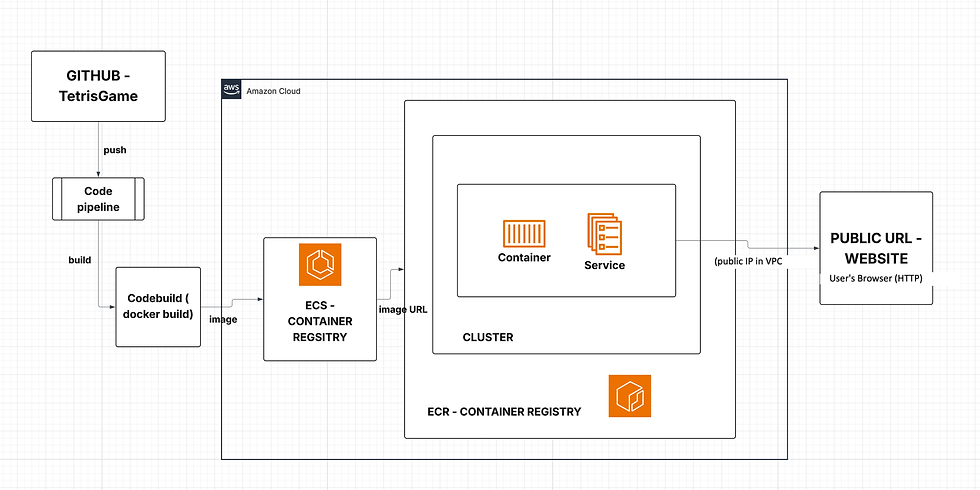
Core services:
GitHub – source of truth for your code
Docker – builds your app into an image
ECR – Docker image registry
ECS Fargate – runs your container without managing servers
CodeBuild – builds and pushes images automatically
CodePipeline – wires GitHub → CodeBuild → ECS deployment
VPC + Security Groups – networking & access control
Phase 1 – Simple Tetris Web UI + Dockerfile
I didn’t start with a complex SPA. I used a simple static HTML mock of a Tetris board, just to have something visual.
index.html
<!DOCTYPE html>
<html lang="en">
<head>
  <meta charset="UTF-8" />
  <title>My AWS Tetris</title>
  <style>
    body {
      background: #111;
      color: #eee;
      font-family: Arial, sans-serif;
      text-align: center;
    }
    #board {
      margin: 30px auto;
      width: 200px;
      height: 400px;
      background: #222;
      display: grid;
      grid-template-columns: repeat(10, 20px);
      grid-template-rows: repeat(20, 20px);
      gap: 1px;
    }
    .cell {
      width: 20px;
      height: 20px;
      background: #333;
    }
  </style>
</head>
<body>
  <h1>My AWS Tetris</h1>
  <div id="board"></div>
  <script>
    const board = document.getElementById('board');
    for (let i = 0; i < 200; i++) {
      const cell = document.createElement('div');
      cell.classList.add('cell');
      board.appendChild(cell);
    }
  </script>
</body>
</html>
This just renders a 10×20 grid that looks like a Tetris board.
Dockerfile (NGINX)
I used NGINX as a static file server:
FROM nginx:alpine

# Copy our static site into nginx's default html directory
COPY index.html /usr/share/nginx/html/index.html

EXPOSE 80

CMD ["nginx", "-g", "daemon off;"]
Build and test locally:
docker build -t tetris-game-repo:latest .
docker run -p 8080:80 tetris-game-repo:latest
Then open:
If you see the “My AWS Tetris” grid, Docker + app are working.

Phase 2 – Push the Image to Amazon ECR (us-east-1)
Next, I pushed this image to Amazon ECR (Elastic Container Registry) in us-east-1.
What is ECR?
Amazon ECR is AWS’s managed Docker image registry.
Think “private Docker Hub inside AWS” with IAM-based auth.
Steps
In the AWS console → ECR → Create repository
Name: tetris-game-repo
Private repository
Region: us-east-1
Login from your terminal (using AWS CLI):
aws ecr get-login-password --region us-east-1 \
  | docker login \
    --username AWS \
    --password-stdin 115283375912.dkr.ecr.us-east-1.amazonaws.com
Tag and push:
docker tag tetris-game-repo:latest \
  115283375912.dkr.ecr.us-east-1.amazonaws.com/tetris-game-repo:latest

docker push 115283375912.dkr.ecr.us-east-1.amazonaws.com/tetris-game-repo:latest
Now the image lives in AWS and can be pulled by ECS.

Phase 3 – Run the Container with ECS Fargate
What is ECS Fargate?
ECS – Elastic Container Service, an orchestrator for containers
Fargate – serverless compute for containers; no EC2 instances to manage
You define how the container should run (task definition) and ECS handles scheduling and running it on Fargate.
3.1 – Create Cluster
AWS console → ECS → Clusters → Create cluster
Name: tetris-cluster
Infrastructure: Fargate

3.2 – Task Definition
Task Definition = “how to run this container.”
ECS → Task Definitions → Create new
Family: tetris-task
Launch type: Fargate
CPU: 0.25 vCPU
Memory: 0.5 GB
Execution role: ecsTaskExecutionRole (or auto-create)

Container:
Name: tetris-container
Image URI:
115283375912.dkr.ecr.us-east-1.amazonaws.com/tetris-game-repo:latest
Port mappings:
Container port: 80
Protocol: tcp
3.3 – Service (with public IP, no load balancer)
Service = “keep N copies of this task running.”
ECS → Clusters → tetris-cluster
Create → Service
Launch type: Fargate
Task definition: tetris-task
Service name: tetris-task-service-…
Desired count: 1
Networking:
VPC: default VPC
Subnets: 1–2 public subnets (e.g. in us-east-1a and us-east-1b)
Security group:
Inbound rule: HTTP, port 80, source 0.0.0.0/0
Auto-assign public IP: ENABLED
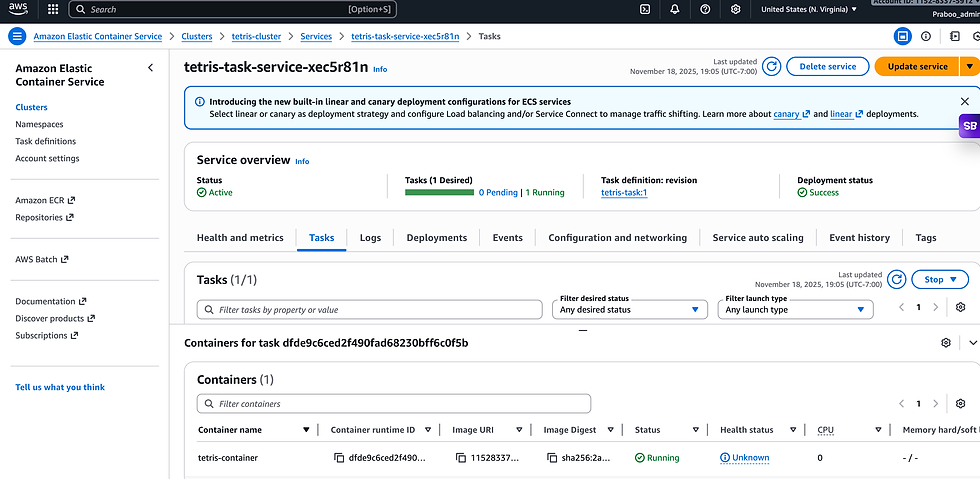
After the service starts, go to:
Cluster → Tasks → select the RUNNING task
Check the Public IP in the Network section
Open in browser:
You should see the Tetris board, now served from ECS Fargate in us-east-1.( for now i suspended it)

Phase 4 – Automating Everything with CodeBuild & CodePipeline
Manually running docker build, docker push, and updating ECS is boring and error-prone.
I wanted full CI/CD:
git push → pipeline builds image → pushes to ECR → updates ECS service.
4.1 – GitHub Repo
Contents:
index.html
Dockerfile
buildspec.yml
4.2 – buildspec.yml for CodeBuild (us-east-1)
This file tells CodeBuild how to build and push the Docker image and produce imagedefinitions.json for ECS.
version: 0.2

env:
  variables:
    REPOSITORY_URI: 115283375912.dkr.ecr.us-east-1.amazonaws.com/tetris-game-repo
    CONTAINER_NAME: tetris-container

phases:
  pre_build:
    commands:
      - echo Logging in to Amazon ECR in us-east-1...
      - aws ecr get-login-password --region us-east-1 | docker login --username AWS --password-stdin $REPOSITORY_URI
      - COMMIT_HASH=$(echo $CODEBUILD_RESOLVED_SOURCE_VERSION | cut -c 1-7)
      - IMAGE_TAG=${COMMIT_HASH:=latest}

  build:
    commands:
      - echo Building Docker image...
      - docker build -t $REPOSITORY_URI:$IMAGE_TAG .

  post_build:
    commands:
      - echo Pushing image...
      - docker push $REPOSITORY_URI:$IMAGE_TAG
      - echo Writing imagedefinitions.json for ECS...
      - printf '[{"name":"%s","imageUri":"%s"}]' "$CONTAINER_NAME" "$REPOSITORY_URI:$IMAGE_TAG" > imagedefinitions.json

artifacts:
  files:
    - imagedefinitions.json
Key idea:
REPOSITORY_URI = ECR repo in us-east-1
CONTAINER_NAME = must match ECS container name (tetris-container)
Output: imagedefinitions.json for ECS deployment
4.3 – CodeBuild project
AWS Console → CodeBuild → Create build project
Name: tetris-game-build
Source: GitHub → Tetrisgame repository
Environment:
Managed image
OS: Amazon Linux 2
Standard runtime
Privileged mode: enabled (so Docker works)
Buildspec: “Use buildspec.yml from source”
Artifacts: none (handled by CodePipeline)
4.4 – CodePipeline
AWS Console → CodePipeline → Create pipeline
Name: tetris-game-pipeline
Source stage:
Provider: GitHub
Repo: prabhu31297/Tetrisgame
Branch: main
Build stage:
Provider: CodeBuild
Project: tetris-game-build
Deploy stage:
Provider: Amazon ECS
Cluster: tetris-cluster
Service: tetris-task-service-...
Image definitions file: imagedefinitions.json
Once created, CodePipeline immediately does one full run:
Pull source → Build Docker → Push to ECR → Update ECS service
Phase 5 – CI/CD in Action
Now the workflow is simple:
Edit index.html:
<h1>My AWS Tetris – CI/CD Test</h1>Commit and push:
git add index.html
git commit -m "CI/CD test heading"
git push
CodePipeline picks up the push and runs:
Source → Build → Deploy
After the pipeline succeeds, refresh:
http://<TASK_PUBLIC_IP>/You’ll see the updated heading. No manual Docker or ECS steps.
Explaining Each AWS Service (for Interview / Blog Readers)
ECR (Elastic Container Registry)
Used as a private Docker registry. The pipeline pushes images here, and ECS pulls them to run tasks. It’s integrated with IAM, so only allowed roles can pull/push.
ECS (Elastic Container Service)
Orchestrates container workloads. I used Fargate launch type to avoid managing EC2 instances. ECS ensures that the desired number of tasks stay running.
Fargate
Serverless compute engine for containers. I don’t manage servers, I just pay per vCPU/GB. Great for small services and labs like this.
CodeBuild
Build system in the cloud. It reads buildspec.yml, runs docker build, logs into ECR, pushes the image, and produces imagedefinitions.json. Running builds in AWS (amd64) avoids Mac ARM issues.
CodePipeline
The CI/CD orchestrator. Watches GitHub for changes, triggers CodeBuild, then triggers ECS deployment. It gives a visual pipeline showing each stage.
VPC & Security Groups
The container runs in a VPC subnet with a security group that allows inbound HTTP/80 from the internet. This is how the task’s public IP becomes reachable in the browser.
Find the project code : https://github.com/prabhu31297/Tetrisgame


Comments